I shipped a new page on johnclick.ai: the Harness Engineering radial.
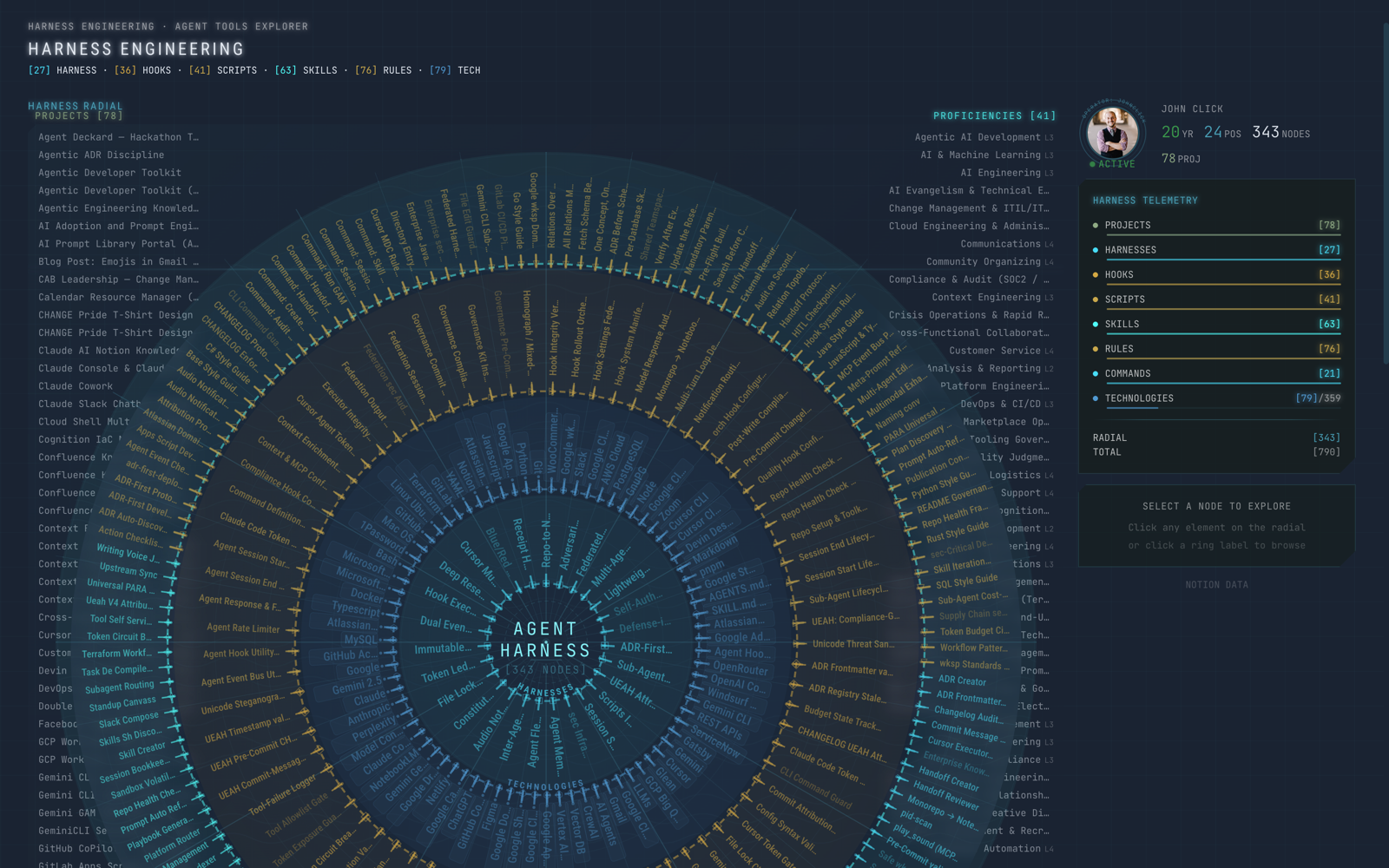
If you've already poked at the knowledge graph — the one where my Notion workspace projects my career history as an interactive force-directed network — the harness radial is the companion piece. The knowledge graph shows WHAT I've done. The harness radial shows the full inventory of components I've built & wired together to govern AI agents across my development workflows.
So this is the parts bin, not the career. 323 nodes arranged in 4 orbits, with two more groups parked in the corners. This post walks through what you're actually looking at.
A quick orientation before the deep dive, because the page predates a redesign & I want to be precise about the current layout:
- The radial is the component inventory for agentic harness engineering — every harness, hook, script, skill, rule, & command I've built, plus the technologies underneath them. (Prompts live in the workspace too, but they sit in the page's explorer rather than on the radial — more on that below.)
- The structure is 4 orbits, drawn inner to outer:
harness-core, thentechnologies, thenhooks-scripts, thenskills · rules · commandson the outside. There's no single "agent" node at dead center — the innermost orbit is the harness core. - Projects & Proficiencies are corner overlays, not orbits. Projects sit top-left, Proficiencies top-right. They frame the radial; they aren't rings inside it.
- These pieces get composed into different harnesses for different work. A Jira-ticket workflow pulls a different set of skills & rules than a deep-research session or a Notion schema migration.
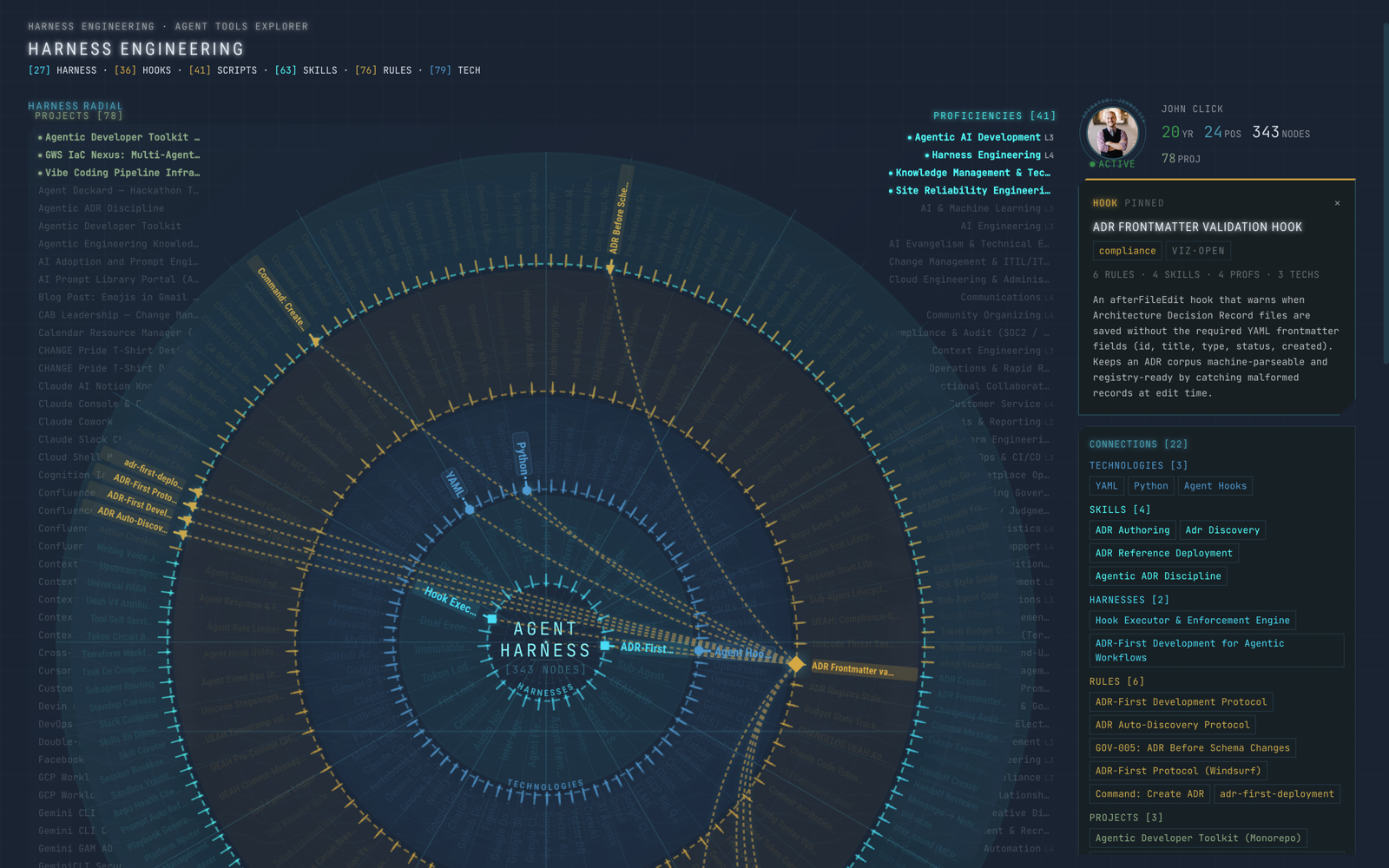
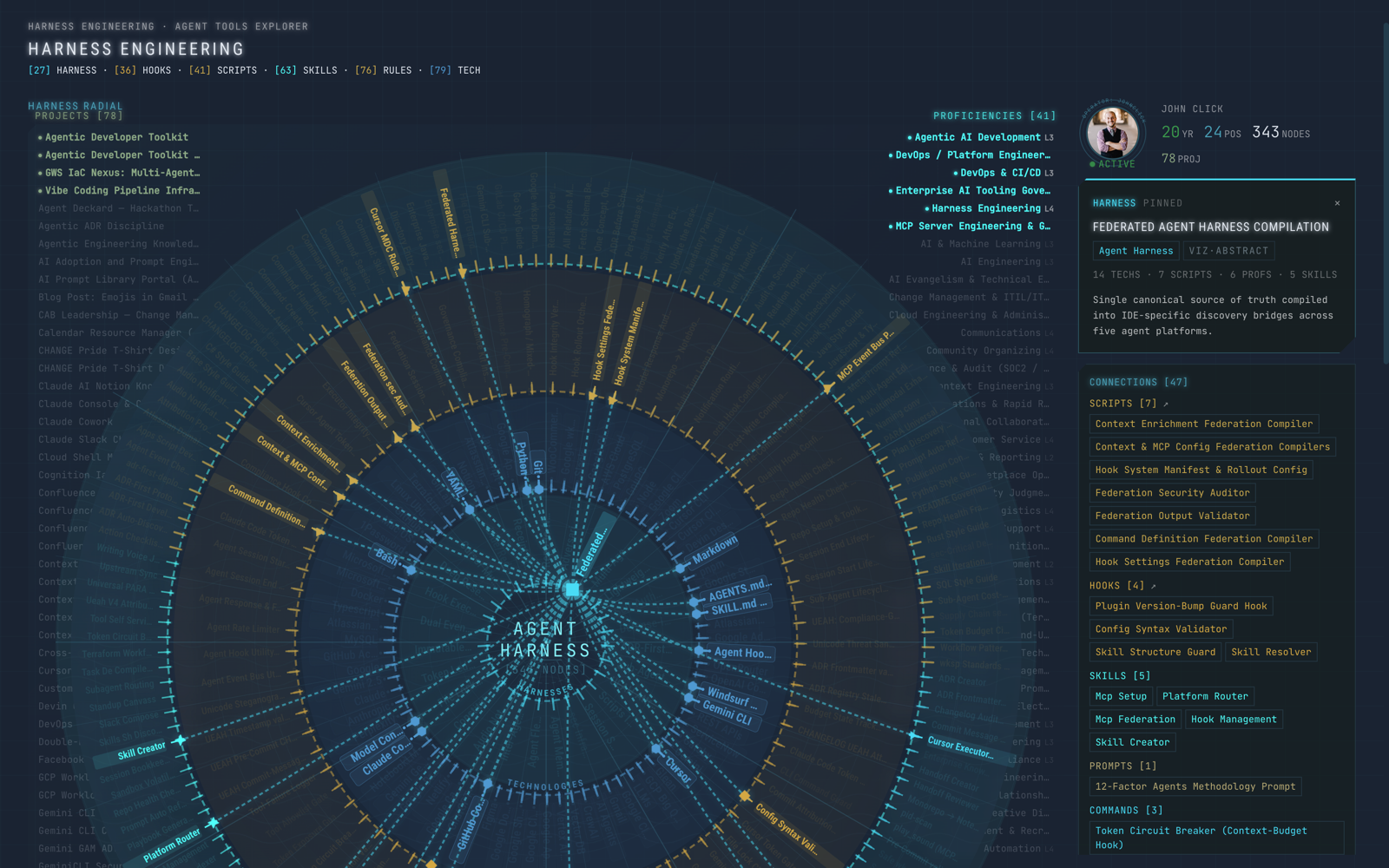
- Every node is a real Notion record with dual relations. Hover one & the detail panel on the right fills in immediately; click one & its connections light up across the orbits.
What is an agentic harness (& what are the components)
The term is still settling, but the idea is straightforward. LangChain's framing is the cleanest I've seen: Agent = Model + Harness. The model is the intelligence. The harness is everything else.
The model generates text, reasons, & plans — that's Claude Opus 4.8, or Gemini, or whichever model I've pointed at the task. The harness is everything that isn't the model: the rules, hooks, skills, scripts, configs, state management, coordination, & enforcement that wrap around it.
Why the wrapper matters: a raw LLM can't hold state across sessions, can't enforce a governance rule, can't coordinate with another agent editing the same codebase, & can't check its own output against a standard. Start a fresh context window & it can't even remember what it did five minutes ago. The harness is what turns a brilliant, amnesiac text predictor into something you'd actually trust near your codebase.
The part that's easy to under-read on the page: there isn't one monolithic harness. Different workflows compose different subsets of these components. A Cursor session doing a Notion schema migration loads the notion-mcp skill, the adr-first-deployment rule, the create-adr command, the hook executor, & the UEAH attribution system. A Claude Code deep-research session loads a totally different set of skills but shares the same enforcement engine & session-state infrastructure. A Gemini CLI receipt-hunting job is its own little specialized harness with its own pieces.
The radial shows the full inventory — the building blocks — not a single assembled harness. It's the parts bin various harnesses get assembled from.
To put a number on the scale of it: I run several agents concurrently across three platforms (Cursor, Claude Code, Gemini CLI) — one orchestrator plus workers. Each session composes its own harness from this shared library. Three platforms, one shared set of building blocks — and a different configuration every session.
The 4 orbits
The radial organizes the inventory into four orbits. I'll walk them the way the page draws them — from the center outward.
Orbit 1 — harness-core (26 harnesses)
The innermost orbit is the harnesses themselves: the runtime infrastructure that actually does the coordinating & enforcing. Each one handles a specific problem. Some run in nearly every session — the hook executor, session state. Others wake up only when they're relevant: the file lock fires when two agents target the same file; the token ledger kicks in as a budget threshold approaches.
This is the orchestration layer. Illustratively, it's things like the hook executor & enforcement engine routing agent actions through validators before they run, the constitutional framework that serves as the shared "soul document," session state & integrity verification, the file-lock mutex for codebases, the immutable handoff protocol, sub-agent routing, the token ledger, agent memory, the fleet registry, the event bus & inter-agent message queue, UEAH attribution, & yes — a sound-notification system, because with several agents going at once I'd rather know who finished by ear than by tab-switching. It helps more than it sounds like it should. (That's a sample, not the full manifest — the live count is whatever harness-core currently holds.)
Not every session lights all of these up. A solo Claude Code coding session might only engage the hook executor, session state, UEAH, & the scripts it calls. A full multi-agent orchestration session adds the file lock, event bus, message queue, sub-agent routing, & token ledger on top. The orbit shows the whole catalog; the workflow picks the subset.
Orbit 2 — technologies (81 technologies)
The next orbit out is the stack everything else runs on — roughly 81 tools, platforms, & frameworks, the same technology data that anchors clusters in the knowledge graph, rendered here to show what actually powers the harness. Python for the enforcement scripts, YAML for the guard configs, Claude & Gemini for the models, Cursor & Claude Code & Gemini CLI for the IDE substrates, Notion for the knowledge-graph backend, & Gatsby + React + Netlify for the frontend rendering this very page. It's the foundation orbit — nothing in the other three works without something here — which is exactly why it sits this far in: it's the layer the whole thing rests on.
Orbit 3 — hooks-scripts (36 hooks + 41 scripts)
This orbit is the enforcement plumbing: the hooks that auto-fire at action boundaries & the scripts they call. This is the layer that makes governance automatic instead of optional, & that distinction is the whole point. I can write an always-on rule telling an agent to update the CHANGELOG.md, & it'll still skip it a meaningful fraction of the time. A hook that fires on commit doesn't forget.
So the hooks are the triggers — they intercept an action, run a check, & either let it through or block it with an explanation. The scripts are the 41-odd Python & shell utilities the hooks & validators actually execute: the secret-injection guards, the Unicode/injection sanitizers, the session-governance checks, the ADR & changelog gates. In the old version of this page, scripts were buried as a single row inside an "execution" ring & hooks weren't represented at all — the page predated hooks being a first-class layer. They're their own orbit now, which is a much more honest picture of how much of the harness is this: small, boring, load-bearing enforcement code.
Orbit 4 — skills · rules · commands (63 skills + 76 rules + 0 commands)
The outermost orbit is the brain — the most numerous layer, which is why it gets the most room. Skills are procedural knowledge modules. Rules are hard constraints. And commands are the action verbs that wire the rest together. It's the most composable layer on the whole page — any given agent session cherry-picks the skills & rules its task actually needs.
The skills break down by type:
- Workflow templates —
jira-ticket-creator,confluence-page-mirror,skill-creator,plan-executor— multi-step procedures an agent follows start to finish. - Agent prompts —
adr-reference-deployment,context-optimizer,anti-thrash-protocol— focused behavioral guidance. - System prompts —
notion-mcp— a full system prompt for a specific tool context. - CLI wrappers —
gitlab-cli,onepassword-cli— vetted usage patterns for a command-line tool. - Platform rules —
PARA Universal Linking,UEAH Attribution Protocol— platform-specific behavioral rules.
The property that makes a skill worth writing is reuse: teach an agent how to file a Jira ticket once, & every agent in the fleet can load that skill whenever a Jira workflow comes up. That's the "teach once, compose anywhere" idea, & it's why this is the layer I add to most often. Some skills show up almost every session (context-optimizer, anti-thrash-protocol); others are specialized (confluence-page-mirror only loads for Confluence work; the IaC skill only when I'm touching Terraform). The orbit shows all 63; a typical session loads maybe five to ten.
The rules are less composable on purpose — you don't cherry-pick a security policy. They're the constraints that apply broadly: enterprise security standards & MCP access policy (what agents can & can't touch), structural guardrails (per-DB skills required, a mandatory parent on page creation so nothing ends up orphaned), naming & style standards (SQL, JS/TS). The commands are the verbs — pre-commit, commit-msg, create-adr, session-save, session-load, security-scan, handoff-create, handoff-review, & the rest — the things that actually invoke a subsystem.
One thing that isn't on this orbit: prompts. The workspace has 89-odd of them — full system prompts down to focused task prompts — but on the radial they added density without conveying capability, so I cleaved them off. They still feed the page's component explorer, so they're a click away; they just aren't drawn as orbit nodes anymore.
The corner overlays: Projects & Proficiencies
Two groups don't belong on any orbit, so they live in the corners.
Projects (73) sit top-left. These are the actual deliverables — some of them harness infrastructure in their own right (the Agentic Developer Toolkit, the GWS IaC monorepo, the MCP directory), others things I shipped using harness components (Confluence knowledge bases, CI/CD pipelines, the websites themselves). Hover or click a node in the radial & the connected projects float to the top of the list & highlight, so you can read a component by what it actually helped ship.
Proficiencies (41) sit top-right & behave the same way: the skills & competencies behind the harness, auto-sorted & highlighted against whatever you've got selected in the radial.
The reason both are overlays instead of rings is structural, not cosmetic. The orbits are components — the things I built the harness out of. A project is an outcome — something I built with the harness. Proficiencies are capabilities — what the work demonstrates about me. Mixing all three into one concentric structure was the main thing that made the old version of this page misleading: it conflated what I built the harness OUT OF with what I built WITH the harness. So projects & proficiencies got pulled to the margins, where they frame the radial without pretending to be part of it.
How this connects to the knowledge graph
The knowledge graph & the harness radial are two views of the same underlying data. Same Notion workspace and the same dual relations, run through the same Gatsby build — different lens.
The knowledge graph is force-directed: you drag, zoom, click, & collapse a network of work history, projects, technologies, & proficiencies. It answers who is this person & what have they done? The harness radial is the structured view — the orbits & overlays I just walked through, sourced from the agent-harnesses, hooks, scripts, skills, rules, commands, technologies, & projects databases. It answers what did this person build to govern their AI agents, & how do the pieces connect?
Because both are built from the same dual relations, a node in one has a counterpart story in the other. A technology that shows up in the radial is the same record that anchors a cluster in the knowledge graph — I just point the build at it differently depending on the question I want the page to answer.
What this page is NOT
I want to be clear about something, because it's easy to over-claim here.
Harness engineering is becoming a recognized discipline. LangChain published a thorough anatomy piece. Anthropic ships hooks & middleware in Claude Code. Commercial tools enforce policies on agent tool calls. The big community Claude Code project has six figures of GitHub stars. "Wrap your agents in governance infrastructure" is consensus now, not a novel insight, & I'm not pretending otherwise.
What's mine is the inventory & the mileage — 26 harnesses, 36 hooks, 63 skills, 76 rules, the 118-odd ADRs underneath them, & coordination across three IDE platforms, built up through daily use in an enterprise environment (the Rivian/VW Tech joint venture) plus personal projects. The page isn't a claim to unique architecture. It's an honest picture of what one person's component library actually looks like at scale — real counts, real connections, real composition patterns nobody else has — & the specifics are the only part that's mine. The concept belongs to everyone now.
And while I'm being honest: a lot of this is still immature. Some of these components sing; others have fallen flat & been rebuilt more than once. That's the nature of working in a discipline this young — you iterate, you get comfortable with the things that didn't work, and the parts bin stays honest about both.
What's next
The radial renders from Notion data at build time today, same as the knowledge graph, & the interaction model is already further along than the first version of this post described:
- Hover surfaces detail. Move over any node & the right-hand panel morphs to show that node, its category, & its dual relations — already shipped.
- Click lights up the connections. Pin a node & its connections draw across the orbits as a batched path, the connected projects & proficiencies in the corners sort & highlight at the same time. The full per-node spars only get drawn for the node you click — it's the difference between rendering everything all the time & rendering the part you're actually looking at. (Site-wide, the underlying mesh is roughly
3398cross-database relations; the radial doesn't draw all of them at once — it draws the slice for whatever you've pinned.) Also shipped. - Connected items already deep-link out. Click a connected proficiency, model, or job in the detail panel & it jumps you to that record's native page. What's not done yet is the inbound direction — a URL that opens the radial already focused on a specific harness or skill. That's the next thing on the list.
So if you want to see it, the best move is to just go poke at it: johnclick.ai/harness-engineering/. Hover around the orbits, pin a few nodes, watch the corners react.
If you want the deeper story on any one layer, the enforcement series covers the hooks & validators in detail (start with Markdown is Agent Enforcement Theater), the ADR-First Development post explains the ADR system the whole harness is governed by, & the knowledge-graph post covers the Notion-to-Gatsby pipeline that makes any of this renderable.
Related reading: Markdown is Agent Enforcement Theater | ADR-First Development | Notion Knowledge Graph | Notion as Context Pipeline
John Click is a Senior IT Solutions Engineer at the Rivian/VW Tech joint venture. He writes at johnclick.ai & johnclick.dev.